

graphics.supply

Creative Effects

Add warmth, texture and a little drama.

28 creative overlays · Digital PNG download

Warm edge light for an editorial portrait. Film marks for a personal series. Sparks that follow the action. Give the image a finish of your own.

For any editor with layers, masks & blend modes

$24USD · one-time payment
Buy & downloadPersonal & commercial use · No subscription

In the edit

Make the finish part of the story.

A little warmth at the edge. Texture through the shadows. Sparks that extend the action. The example photos are AI-generated.

The photo is there. Now give it a point of view.

Sometimes the composition works, the colour is right, and the image still feels a little too clean. Creative Effects gives you two directions to explore: the warmth and imperfections of an analog finish, or the movement of sparks, embers and ash. Choose the treatment that belongs to your photograph, then make it as quiet or as expressive as you like.

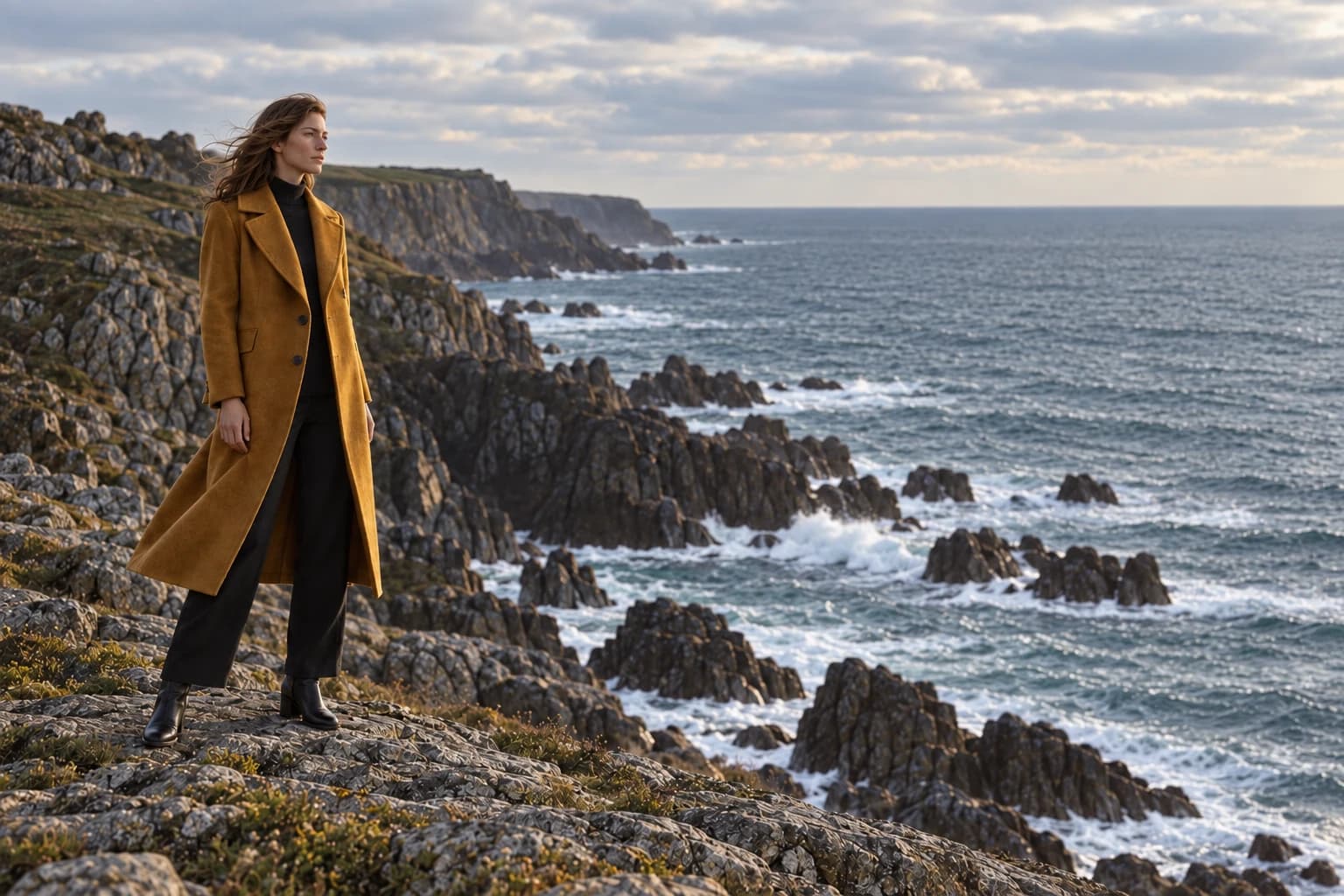
Warm light leaks: base image
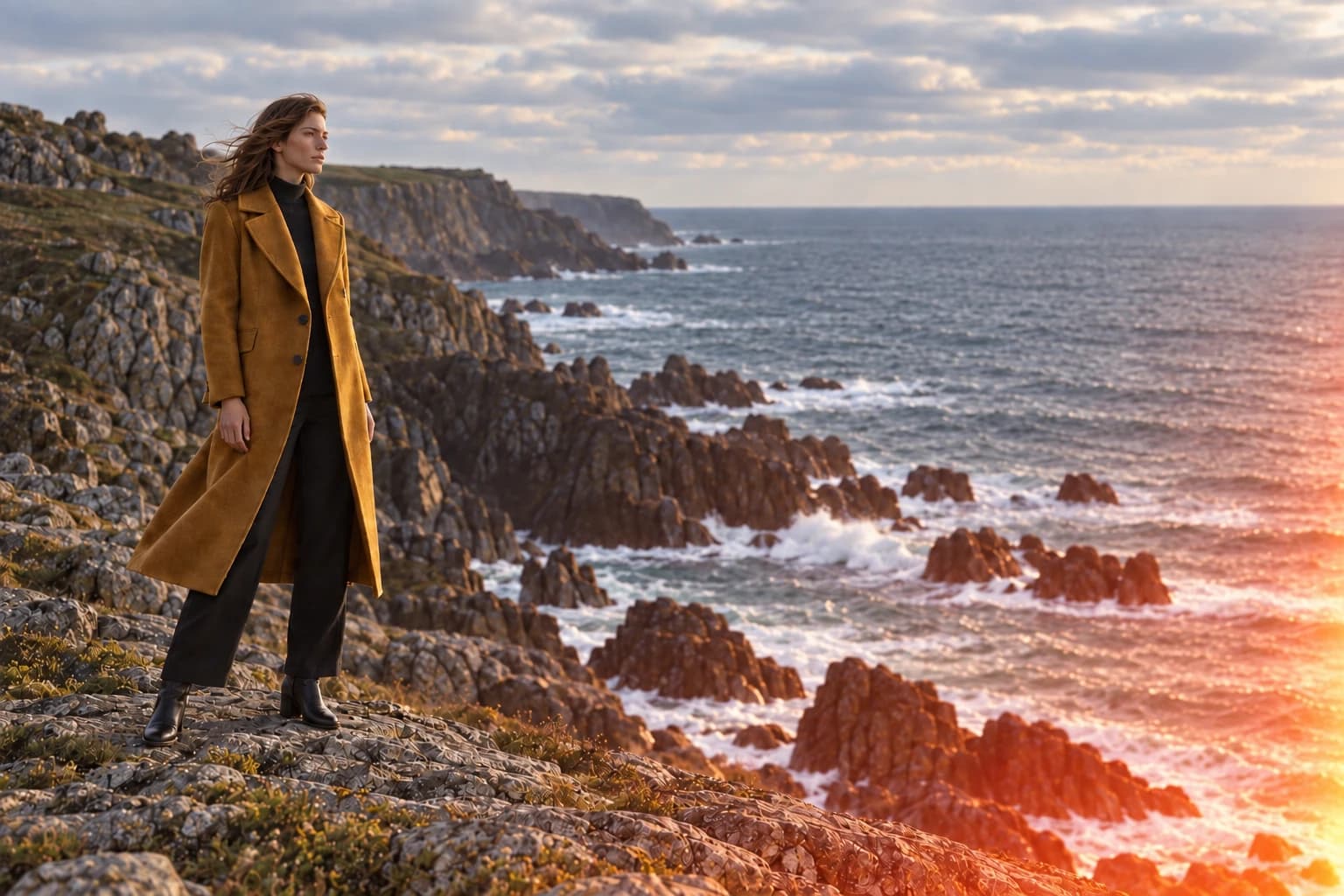
Warm light leaks: AI-assisted example using a collection texture as reference
BeforeAfter
Light leak · Screen blend · AI edit using a PNG reference

Warmth that enters the frame, instead of washing over it.

Bring a light leak in from an edge to echo a sunset, soften a fashion image or give a personal series a warmer finish. Thin amber leaks and broader exposures let you work with a small accent or a more visible wash of light. Optical flares offer another way to extend a bright source already in the scene.

Because the effect is a separate image layer, you decide exactly where the warmth falls. Move it away from skin, rotate it toward the light and reduce its opacity until the original photograph still leads. The same file can feel very different in a wide landscape and a tight portrait.
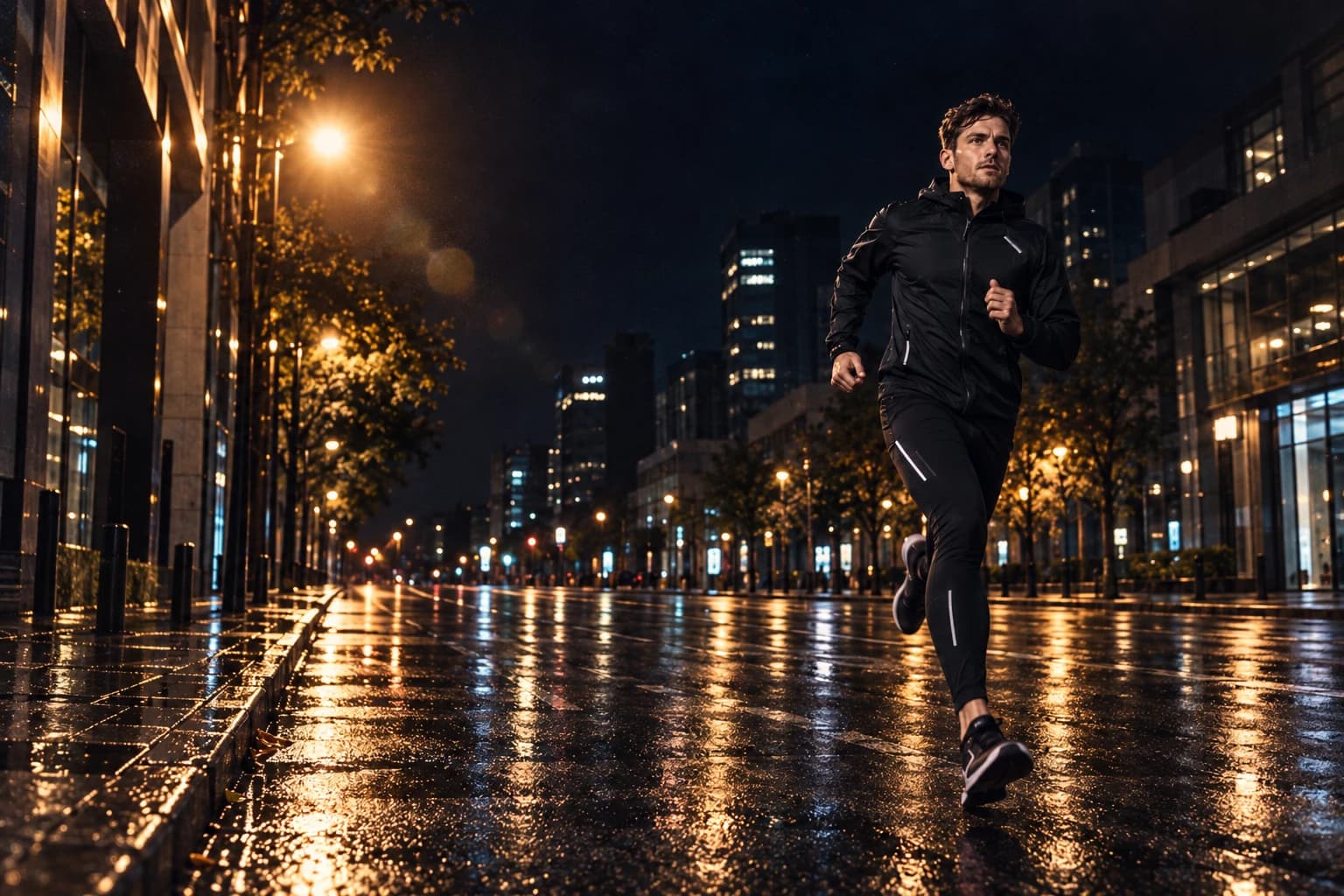
Film marks: base image
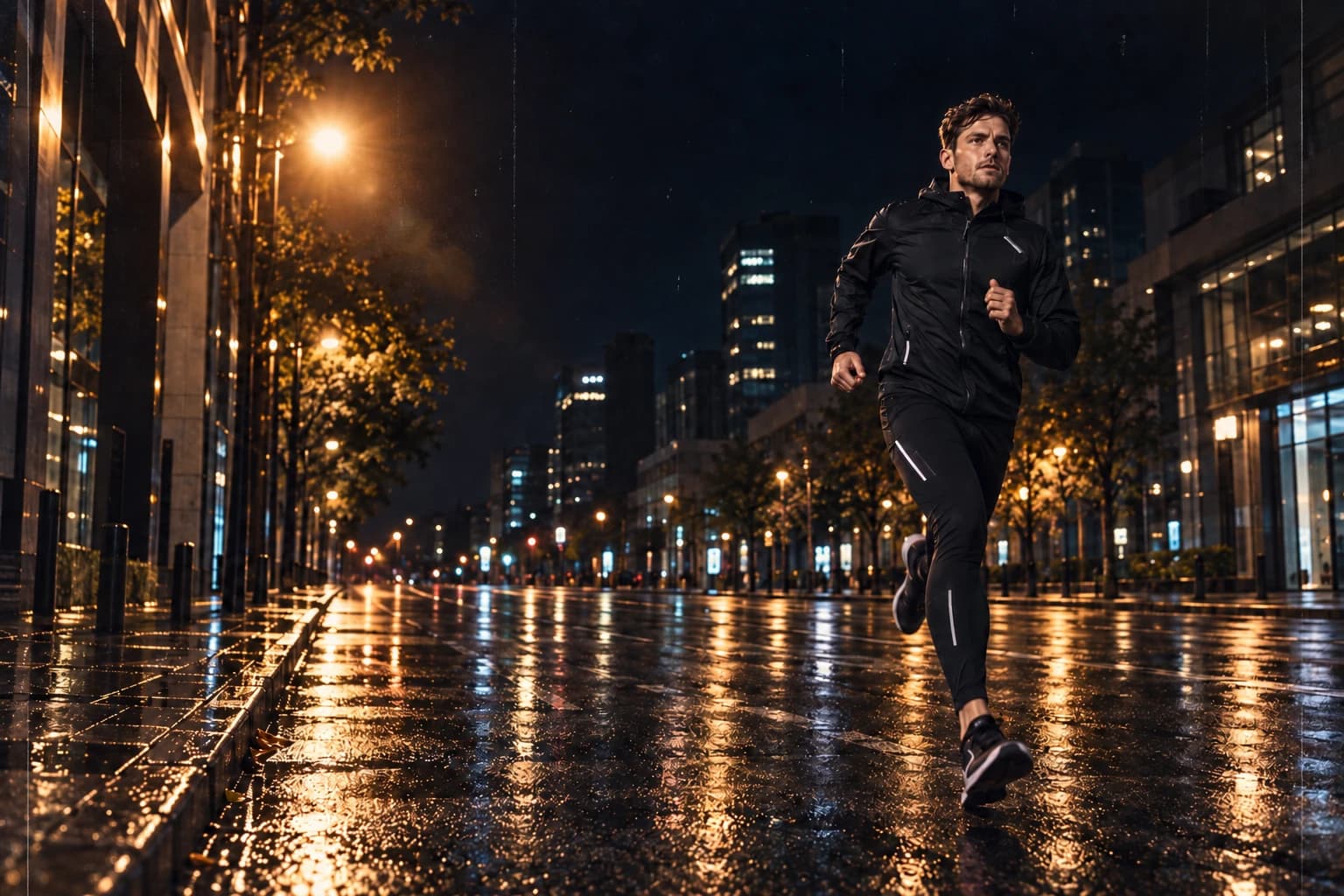
Film marks: AI-assisted example using a collection texture as reference
BeforeAfter
Film marks · controlled opacity · AI edit using a PNG reference

Give a polished image a little imperfection.

Fine scratches and scattered film dust introduce texture into editorial, music and street imagery. Start with a restrained treatment for a close view, or let the marks become more visible in a poster or cover composition. Pale and dark marks give you options for different parts of a photograph.

Keep a clean version underneath and build the finish above it. You can mask the marks away from a face or headline without changing the texture elsewhere. For a related set of images, reuse the same treatment and adjust the strength for each frame instead of forcing one global adjustment onto every shot.

Your download

28 PNGs. Ready for your library.

One ZIP download, approximately 118 MB.

File index, usage notes and personal & commercial licence included.

Analog Finish

14 PNGs

Light leaks, optical flares and film marks.

Cinematic FX

14 PNGs

Directional sparks, glowing embers and drifting ash.

Use the editor you know.

Any editor with PNG layers, masks and blend modes — including Photoshop, Affinity Photo and Photopea.

File dimensions Width × height, in pixels

Landscape
7008 × 4672
Portrait
4672 × 7008
Square
5760 × 5760
Each file comes in one of these shapes.

Everything in this collection, ready for your next edit.

Keep the finish on its own layer.

Work in Photoshop, Affinity Photo or another editor with layers, masks and Screen blending. If you can place an image and adjust its opacity, you can start experimenting; a little masking makes the effect belong to the scene.

Read the full editing guide
  1. Choose the character

    Start with one treatment: a warm edge leak, a film mark or a particle effect. The included index lists each file’s intended use and blend mode, so you can go straight to the right folder.

  2. Place it with purpose

    Put the PNG above your photo. Use Screen for light and glowing particles, or Normal for transparent film marks and ash. Rotate and scale the layer to follow the composition.

  3. Make the photograph lead

    Lower opacity, mask faces and important details, then check the image at its final viewing size. Save the layered working file so you can revise the finish later.

For images that can carry a more expressive finish.

Use this collection for editorial portraits, music artwork, personal photo series, posters and action composites. It is especially useful when you want to change the feeling of an existing edit while keeping your retouching and colour work intact.

These are reusable PNG layers. They do not apply a complete colour grade or analyse your image automatically: you choose the placement and strength. Basic masking skills help with effects that pass behind a subject. Example photographs and editing software are separate from the download.

A few things before you start.

What arrives after checkout?

You receive 28 unique PNG files in organised folders, an English file index, usage notes and a licence. One ZIP download, approximately 118 MB. Open the download link in your order email or Polar customer account, then unzip the files on your computer. The product is a digital download; no physical box is shipped.

What resolution are the files?

Landscape: 7008 × 4672 px. Portrait: 4672 × 7008 px. Square: 5760 × 5760 px. Dimensions are width × height. Each PNG comes in one orientation; the same image is not repeated in every shape. The included file index gives its exact dimensions. Website previews are smaller than the download files.

How do I use these files?

Add the PNG above your photograph in an editor with layers, masks and blend modes, such as Photoshop, Affinity Photo or Photopea. Glowing effects use Screen; dust, scratches and ash use Normal with transparency. Position the layer, lower its opacity and mask important details. You need basic layer and masking skills.

Open the editing guide
Can I use the files for paid client work?

Yes. The included licence covers personal and commercial composites, including flattened client deliverables, social content and advertising. Keep the source PNGs in your own working library; do not redistribute or resell them, including in templates where they can be extracted.

Read the full licence
Are these photos, presets or image layers?

These are PNG image layers made from AI-generated sources and prepared for compositing. Example photographs, Lightroom presets, Photoshop actions and video effects are not included. The base photographs in the examples are AI-generated. Some edits apply the included PNG layers directly; others use the materials as references for an AI-assisted edit. They illustrate possible uses; the download contains the PNG layers, not these finished photographs.

Do I need Full Library?

Creative Effects is a complete, standalone collection. You can use every file in this pack without buying anything else from graphics.supply. Full Library is an option if you also want the other collections; it costs $69 in total.

Where do I get help or find my download?

Use the access link in your order email or open Your downloads from the footer. If you need help, email hello@graphics.supply with your order reference and, for a file issue, the filename and your editor.

What if I have a problem with my purchase?

Contact hello@graphics.supply with your order reference. We can help with missing downloads, damaged files or duplicate purchases. The refund policy explains the conditions that apply to digital downloads.

Read the refund policy

Creative Effects

Put more character into your next edit.

28 PNGs with a file index and usage notes. Download once, make them part of the way you edit.

$24USD · one-time payment
Buy & downloadPersonal & commercial use · No subscription

Secure checkout with Polar. Download help · Refund policy